AI Video Freelancing: $5K/Month With a $37/Month Stack
9 min read · 2,165 words
Demand for AI video freelancers on Upwork grew 329% year-over-year in 2026. That’s not a typo — it’s the fastest-growing skill category on the platform, outpacing AI writing, coding, and design combined. The kicker? The tool stack that lets you compete at a professional level costs $37/month. If you’re living in a low-cost country and billing clients in USD, this is one of the most lopsided income-to-expense ratios in the gig economy right now.
This isn’t about running a faceless YouTube channel and hoping for AdSense. This is about selling video production services to real clients — brands, agencies, e-commerce businesses, and content creators — who need polished short-form videos at scale. They don’t care that you used Kling to generate the footage. They care that you delivered on time and it converted.
Why AI Video Is the Skills Gap Nobody Saw Coming
Traditional video production is expensive and slow. A 60-second brand video from a production agency can run $3,000–$15,000 and take 4–6 weeks. AI video collapses both dimensions. You can produce a polished 60-second ad in a few hours, with one laptop, no crew, and no studio. The quality gap between AI-generated video and traditionally shot content has narrowed dramatically — and for social media formats (where everything is watched on a phone at 1080p), the difference is often invisible to audiences.
The clients who discovered this first were e-commerce brands running performance ads. They need fresh creative constantly — three variations per product, updated weekly, A/B tested against each other. That workflow destroys a traditional video budget. AI video makes it affordable. Which means demand for people who can produce AI video at that pace is exploding.
For expats and digital nomads, the arbitrage is obvious: you’re charging USD rates for a skill that requires nothing but internet access and a laptop. Living in Medellín on $1,400/month while billing $5,000–$8,000 to clients in the US and UK? The math works out to financial independence faster than almost any other remote income path.
The $37/Month Tool Stack That Does the Work
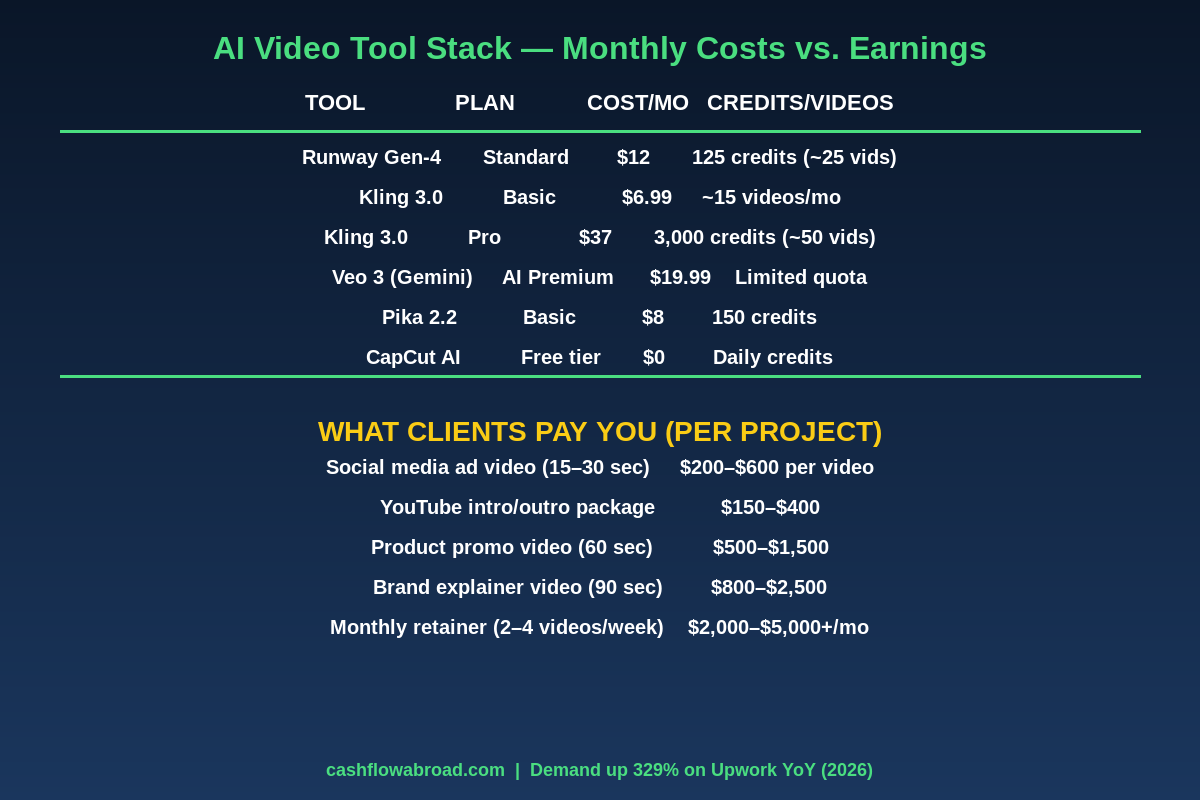
Here’s what professional AI video freelancers actually use in 2026 — with real pricing and what each tool does.
Kling 3.0 — Your Core Generation Engine ($6.99–$37/Month)
Kling 3.0, made by Kuaishou, is currently the best price-to-quality ratio for commercial video generation. The Basic plan at $6.99/month gives you roughly 15 high-quality video generations per month — enough to get started and land your first clients. The Pro plan at $37/month gives you ~3,000 credits, translating to 50+ videos monthly, which is where you scale.
Kling generates native 4K output, supports up to 3-minute videos, and handles character consistency better than most alternatives. For product showcases and brand videos, it’s the workhorse. Prompt it with a camera angle, lighting style, and action description — it renders in 3–5 minutes.
Runway Gen-4 — Agency-Grade Finishing ($12/Month Standard)
Runway Gen-4 has become the agency-standard tool for precise control. Where Kling excels at raw generation, Runway is stronger at motion control, multi-shot continuity, and fine-tuned outputs. The Standard plan at $12/month gives 125 credits (~25 videos). Use Runway for client work that needs exact framing and cinematic camera moves.
Combined with Kling, your monthly tool cost is $43.99 for a dual-engine setup. The $37 Kling Pro alone is enough to start, which is where the “$37/month” headline comes from.
Google Veo 3 — Audio-Native Video ($19.99/Month)
Veo 3, accessed through Google One AI Premium at $19.99/month, introduced something no other model has: native audio generation. It generates dialogue, ambient sound, and sound effects directly — no separate audio editing step. For explainer videos and content that needs narration, this is a real differentiator. The full Veo 3 Ultra tier costs $249.99/month and is overkill for freelancers; the $19.99 tier via Gemini covers most client needs.
CapCut AI — Free Post-Production
CapCut’s AI features (auto-captions, background removal, smart cut, template matching) are completely free. After generating your raw video in Kling or Runway, CapCut handles subtitles, transitions, music sync, and platform-specific formatting. For social media deliverables, CapCut is where the polished final product comes from. Don’t pay for Premiere Pro when CapCut’s AI does 80% of what clients need at zero cost.
Pika 2.2 — Quick Special Effects ($8/Month)
Pika is useful for fast iterations and “Pikaffects” — its suite of special effects (crush, melt, explode, inflate) that add viral creative elements to product videos. At $8/month for 150 credits, it’s a cheap add-on for e-commerce clients who want eye-catching product reveals.
What You Actually Sell (and What Clients Pay)
The mistake most beginners make is listing “AI video creation” as a service. That’s too vague. Clients don’t buy tools — they buy outcomes. Here are the specific service packages that convert on Fiverr and Upwork, with realistic pricing:
| Service | Deliverable | Your Price | Your Time |
|---|---|---|---|
| Social media ad video | 15–30 sec, 3 format variants (9:16, 1:1, 16:9) | $250–$600 | 3–5 hours |
| YouTube intro/outro package | 5-sec intro + 10-sec outro, branded | $150–$400 | 2–3 hours |
| Product promo video | 60-sec lifestyle showcase with VO | $500–$1,500 | 4–8 hours |
| Brand explainer video | 60–90 sec, script + visuals + audio | $800–$2,500 | 6–12 hours |
| Monthly retainer (e-commerce) | 8–16 videos/month for ad testing | $2,000–$5,000 | ~40–60 hours |
The retainer model is where the money is. E-commerce brands running Meta and TikTok ads need constant fresh creative. One retainer client at $3,000/month is already $36,000/year — from a single contract, with $37/month in tool costs. Two retainer clients and you’re clearing more than the median US software engineer salary while living in Tbilisi or Chiang Mai at a fraction of the cost.
The Actual Workflow (Step by Step)
Here’s the end-to-end process for a $500 social media ad package — three video variants for a client’s skincare brand:
Step 1 — Brief Extraction (30 Minutes)
Get the client’s brand kit (colors, logo, fonts), target audience description, key product benefit, and reference ads they like. Most clients have a competitor’s ad they wish they’d made. That’s your creative brief.
Step 2 — Script and Prompt Writing (45 Minutes)
Write a 5-sentence visual script for each variant. Convert each sentence into a Kling prompt. Be specific about camera movement, lighting, and setting:
Kling Prompt Example:
"Close-up slow-motion shot of a woman's face,
natural morning light from window left,
she applies cream to cheek with fingertip,
peaceful expression, soft focus bokeh background,
cinematic color grade, 4K"
Vague prompts produce generic output. Specific, cinematic prompts produce deliverable-quality footage on the first or second attempt.
Step 3 — Generation and Selection (1–2 Hours)
Queue your prompts in Kling. Each generation takes 3–5 minutes. Generate 2–3 variations per scene, pick the best take, and stitch the scenes together. You typically keep 30–40% of what you generate — the rest gets discarded. That’s normal; it’s part of the process.
Step 4 — Post-Production in CapCut (1 Hour)
Import your selected clips. Add music from CapCut’s licensed library (free for commercial use), auto-sync the beat, overlay text hooks, add subtitles, and export in three aspect ratios. CapCut’s “Auto Captions” feature transcribes and styles captions in under two minutes.
Step 5 — Delivery and Revisions (30 Minutes)
Deliver via Google Drive or Dropbox link. Offer one round of revisions included — clients typically want minor text tweaks or a different music track, not a full regeneration. Budget 30 minutes for this.
Total time for a $500 package: 4–5 hours. That’s $100–$125/hour. In Medellín, where a furnished one-bedroom runs $600–$800/month, that’s an extraordinary effective rate.
The Geographic Arbitrage Math
This is where the expat advantage becomes undeniable. The clients paying these rates are in the US, UK, Australia, and Western Europe — where $500 for a video is a rounding error in a marketing budget. You’re collecting those USD payments while your fixed costs are in Colombian pesos, Georgian lari, or Thai baht.
| Location | Monthly Living Cost | Tool Cost | Break-Even Revenue | Net at $5K/Mo |
|---|---|---|---|---|
| Medellín, Colombia | $1,200–$1,500 | $37–$80 | ~$1,580 | $3,420+ |
| Tbilisi, Georgia | $900–$1,200 | $37–$80 | ~$1,280 | $3,720+ |
| Chiang Mai, Thailand | $800–$1,200 | $37–$80 | ~$1,280 | $3,720+ |
| Lisbon, Portugal | $2,000–$2,800 | $37–$80 | ~$2,880 | $2,120+ |
| New York City | $4,500–$6,000 | $37–$80 | ~$6,080 | Break-even or loss |
The same output, the same skill, the same clients — but in Tbilisi you’re banking $3,700/month and in New York you’re barely covering rent. Compounded over 2–3 years, that’s the down payment on real estate, a funded startup, or an early retirement. All from a video skill that didn’t exist as a career category 18 months ago.
For a deeper look at the geoarbitrage framework, see our Geographic Arbitrage Playbook — covering the top 10 countries by cost-efficiency for digital workers.

Where to Get Your First Clients
Fiverr and Upwork
Both platforms work — but differently. On Fiverr, you set the price and clients come to you. Post three gigs: one for social media ad videos, one for product showcase videos, one for YouTube content. Use the word “AI” in the gig title — buyers actively search for it. Fiverr takes a flat 20% commission, so price accordingly (charge $300 knowing you’ll net $240).
On Upwork, you bid on posted jobs. Filter by “AI video” and “video production” in the $500+ range. Upwork’s fee structure: 20% on first $500 per client, 10% from $500–$10,000, 5% above that. Once you land a retainer client, the 5% tier kicks in and you keep 95 cents of every dollar. That’s a sustainable business model.
Direct Outreach to E-Commerce Brands
Use Facebook’s Ad Library (free) to find Shopify stores running Meta ads. Filter by brands in your niche — beauty, fitness supplements, home goods. Look for stores running the same 3 creatives for 3+ months. They’re stale and the owner knows it. Cold email:
Subject: Your ad creative from [Month]

Hey [Name],

I noticed your Meta ads haven't rotated in a while.
I specialize in AI-generated video for e-commerce brands.
I can deliver 5 new variations for $800, ready in 5 days.

Here's a sample I made for a similar product: [link]

Worth a quick call?
This converts at higher rates than Fiverr because there’s no platform fee, the client didn’t search for the lowest bidder, and you opened with proof.
TikTok and Instagram Brands
Search hashtags like #smallbusiness, #shopsmall, and product-specific tags. DM brands with under 50K followers who are posting static images only — they clearly don’t have a video production solution. Offer a free 15-second sample video. Conversion rates on this approach consistently run 10–20% when the sample is quality.
Setting Up the Business Properly Abroad
If you’re operating as a US person abroad, take payments via Stripe or PayPal connected to a US LLC. Mercury offers a US business bank account specifically built for non-US-resident founders — it’s the cleanest way to collect USD when you’re living abroad, with no minimum balance and no monthly fees.
For maintaining a US address (required for LLC registration and most payment processors), a Traveling Mailbox virtual address handles your business mail digitally and forwards anything physical. Cost: around $15/month.
For hosting a client-facing portfolio or delivery portal, DigitalOcean offers reliable cloud hosting from $6/month — far cheaper than website builders, with full control. And always use NordVPN when handling client files and payment data on café and co-working Wi-Fi.
For a full breakdown of running a US business from abroad while minimizing tax exposure, see How I Run a US Business While Living in Colombia.
Realistic Ramp Timeline
| Month | Focus | Expected Revenue |
|---|---|---|
| 1 | Learn Kling + CapCut, build 3 portfolio samples, set up Fiverr/Upwork profiles | $0–$500 |
| 2 | First paid gigs, refine workflow, collect 5-star reviews | $500–$1,500 |
| 3 | Direct outreach, raise prices to market rate, add Runway to stack | $1,500–$3,000 |
| 4–5 | Land first retainer client, reduce platform dependency | $3,000–$5,000 |
| 6+ | Two to three retainers, referrals, possibly subcontract overflow | $5,000–$10,000+ |
These aren’t guaranteed numbers — they’re what happens when you treat this like a business rather than a side hustle. The freelancers who stall at Month 2 post one portfolio piece and wait. The ones who hit $5K by Month 5 send 20 cold DMs a day in Month 1.
What Clients Actually Want (and What Gets You Fired)
The most common reason AI video freelancers lose clients early: over-promising on realism. AI video still has tells — subtle hand inconsistencies, minor physics errors on fast motion. Clients who don’t know what to expect, and see artifacts in their delivered video, feel deceived.
Set expectations in the proposal: “I use AI generation tools to produce cinematic footage optimized for social media. Here’s what it looks like.” Show samples before taking the deposit. Clients who hire you knowing the process are satisfied. Clients who expected a film crew aren’t, regardless of quality.
The other failure mode is missing delivery dates. Clients build ad campaign launches around your timeline. A 24-hour slip can break a campaign. Always give yourself a 3-day buffer over your actual production time — deliver early and you’ll look like a superstar.
The Bottom Line
AI video freelancing is one of the most concrete, immediate opportunities to emerge from the AI wave — and expats are disproportionately positioned to benefit. Tool costs are trivial. Demand is growing faster than supply. The skill ceiling is reachable in weeks, not years. And geographic arbitrage means every dollar you earn goes 3–4x further than it would from a high-cost city.
The entire playbook: Kling 3.0 Pro at $37/month, CapCut for free, two portfolio samples, and your first cold outreach to a brand running stale ads. That’s the whole start. Everything else is reps.
For more on building location-independent income, see our guide on Passive Income Streams That Work From Any Country.
Financial disclaimer: Income figures cited are based on publicly available platform data and reported freelancer earnings; they are not guaranteed results. Freelance income varies significantly based on skill, client acquisition, market conditions, and effort. This post is for informational purposes only and does not constitute financial, legal, or tax advice. Consult a qualified professional before making business or investment decisions.
Liked this article?
Get the next one delivered straight to your inbox — plus a free Expat Tax Cheat Sheet.
Join our subscribers. No spam — just expat finance intel and new post notifications.