Virtual Mailbox for Expats: Keep Your US Banking Alive
A $15/month US street address keeps your bank accounts open, IRS mail delivered, and brokerage intact. Here's exactly how expats set it up.
How a $15/month virtual mailbox keeps expat bank accounts open, IRS mail received, and brokerages intact. Best states and step-by-step setup.
Disclosure: this article contains affiliate links. If you open an account through one of them, Cashflow Abroad may earn a referral commission at no extra cost to you.
Most US expats lose access to their bank accounts not because they're flagged for money laundering, not because they missed a payment — but because they updated their address. That single administrative act can trigger an account review, a frozen account, or a mailed letter that never reaches them. The fix costs $15 a month and takes 20 minutes to set up. Most people learn about it after the damage is done.
A virtual mailbox gives you a real US street address — not a PO Box, not a mail-forwarding service — in a state of your choosing. For expats, it's the infrastructure layer that keeps American banking, brokerage accounts, IRS correspondence, and state domicile intact while you live abroad. This guide covers exactly how to set it up, which state to use, and which providers actually work with banks.
Why US Expats Lose Their Bank Accounts
Banks are required under the USA PATRIOT Act to maintain accurate address records for all customers. When you update your address to a foreign country, you trigger one or more of the following: an automatic account review, a compliance hold, or in worst-case scenarios, account closure with 30 days' notice.
The less obvious version happens when banks detect a foreign IP address for online banking logins, or when debit card activity patterns shift to a foreign country. Some banks cross-reference address data with credit bureaus and flag the discrepancy. Chase, Bank of America, and Citibank have all closed accounts belonging to expats in this manner — without advance warning.
Schwab's international accounts are a notable exception (more on those below), but most retail banks and brokerages operate on the assumption that their customers live in the United States. The moment the system detects otherwise, you're in a grey zone.
The solution isn't to hide from your bank. It's to maintain a legitimate US address through a service designed for exactly this purpose.
What a Virtual Mailbox Actually Is
A virtual mailbox is a service provided by a Commercial Mail Receiving Agency (CMRA). You're assigned a real US street address — an actual building in an actual city — where your mail is received, scanned, and made available online within hours. You can forward physical mail, deposit checks (some services), or shred it remotely.
The key distinction: it's a street address, not a PO Box. 123 Main Street Suite 400, Tampa FL 33602 looks identical to a commercial office address. This matters enormously for banking and government forms, both of which explicitly reject PO Boxes.
What it is NOT: a legal domicile by itself. Having a Florida virtual mailbox doesn't make you a Florida resident for tax purposes — that requires intent, physical presence history, and usually a few other ties to the state. But it's the foundation of a legitimate domicile strategy, and it keeps your financial infrastructure from collapsing while you're abroad.
Four Reasons Every US Expat Needs One
1. Banking and Credit Card Access
Banks require a domestic street address for account maintenance. Most will not allow an international address as your primary address on file — and many now run automated checks against address databases to flag CMRAs. If your address gets flagged, some banks will request documentation before proceeding.
The practical approach: establish your virtual mailbox address before you leave, update your address at all financial institutions before you leave, and never update to a foreign address. If asked by a bank, the virtual mailbox address is your US mailing address — which is factually accurate, since that's where you receive US-addressed mail.
2. IRS and Tax Correspondence
The IRS mails critical notices — audit notices, CP2000 underreporter queries, identity verification letters — to your address on file. If those letters go to an address where you don't receive mail, you have 30–90 days to respond before the situation escalates. Missing an IRS notice can turn a routine inquiry into a default assessment.
Your virtual mailbox address goes on your Form 1040 and all IRS correspondence. Most services scan mail within 24 hours and send you an email notification. You can review the scan, decide what to do, and never miss a deadline from a missed letter.
3. Brokerage and Investment Accounts
This is where it gets particularly painful. Fidelity, Vanguard, and TD Ameritrade (now Schwab) have all restricted or closed accounts belonging to US citizens who list a foreign address. Foreign-resident account holders trigger additional regulatory requirements under FATCA and local securities laws in many countries, which most retail brokerages simply won't support.
Navigating PFIC rules and brokerage access as an expat is genuinely complex — but the first line of defense is straightforward: maintain a US address so your brokerage treats you as a domestic account holder. Charles Schwab International is the most expat-friendly brokerage (free ATM withdrawals worldwide, no foreign transaction fees, and they're explicit about supporting expats), but even Schwab benefits from having a clean US address on file.
4. State Domicile and Tax Residency
If you lived in a high-tax state like California or New York before moving abroad, that state may continue to assert tax residency over you unless you clearly establish domicile elsewhere. Domicile is the state you consider your permanent home — and the strongest evidence of changed domicile is establishing connections to a new state: a new address, a new driver's license, voter registration, and the intent not to return to the old state.
A virtual mailbox in a zero-income-tax state is step one of that process. It doesn't complete the domicile change by itself, but it anchors you to the right state for IRS mailing address, future driver's license renewal, and financial account addresses. The full expat banking and tax setup guide covers this in more depth.
The CMRA Problem Banks Won't Tell You About
Here's the trap most expats walk into: they sign up for a virtual mailbox, update their banking information, and then their bank rejects the address update — or worse, flags their account — because the address is registered in USPS's CMRA database.
USPS maintains a list of all registered CMRAs. Some banks run automated checks against this list and flag or reject addresses that appear on it. The result: you think you've solved the problem, but your address gets bounced back or your account gets reviewed anyway.
The workaround: choose a virtual mailbox provider that uses addresses not universally flagged as CMRAs, or that uses suite numbers rather than pound signs (#) to denote unit numbers. "Suite 400" reads differently to bank systems than "#400." Ask your provider directly whether their addresses pass bank verification checks. The better services — Traveling Mailbox being the one we use — specifically maintain addresses that work for financial accounts and will tell you upfront which addresses are bank-safe.
Choosing the Right State
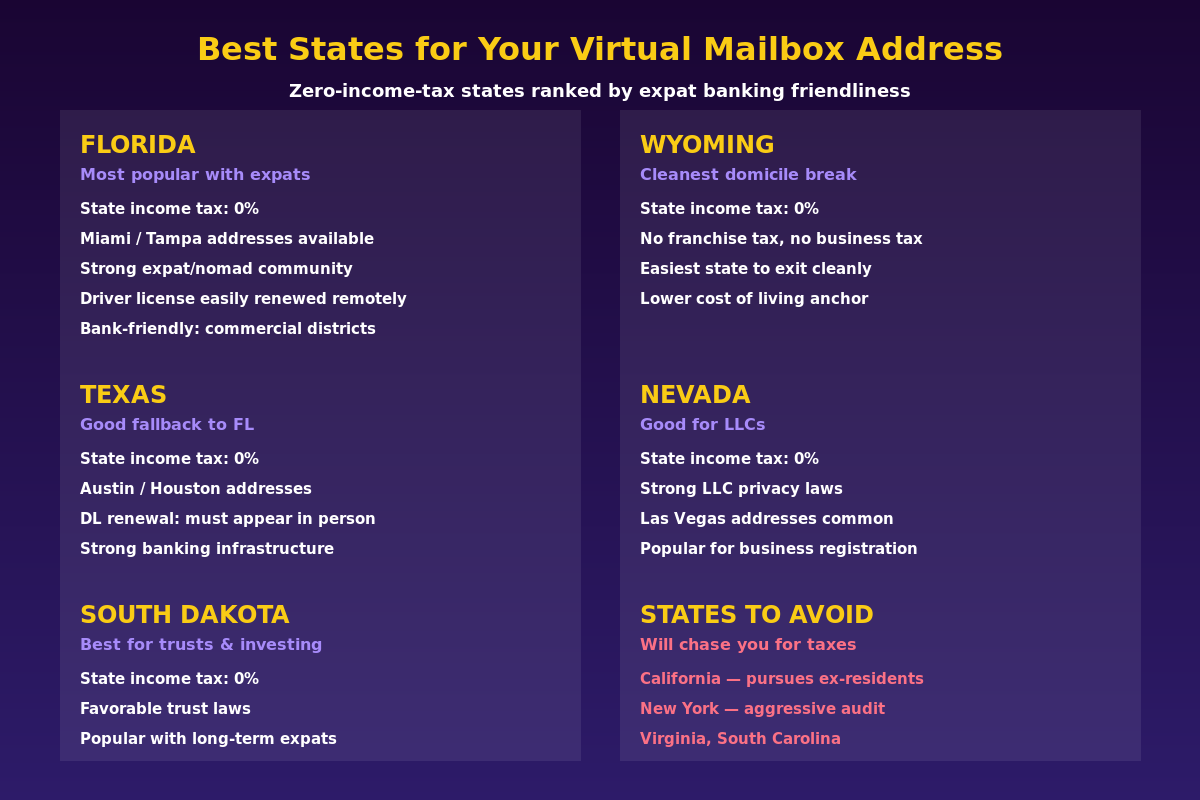
The state you pick for your virtual mailbox has real consequences — both tax and practical. The short answer: use a zero-income-tax state. The longer answer involves which zero-income-tax state is easiest to maintain as a non-resident.
| State | State Income Tax | Best For | Gotchas |
|---|---|---|---|
| Florida | 0% | Most popular; huge expat community; easy DL renewal | None major for expats |
| Texas | 0% | Strong fallback; major cities with good addresses | In-person DL renewal required after expiration |
| South Dakota | 0% | Trust laws; long-term expats; clean domicile | Less familiar to banks than FL/TX |
| Wyoming | 0% | No franchise tax; cleanest business setup | Limited address variety |
| Nevada | 0% | LLC privacy; business registration | Las Vegas addresses can look unusual on forms |
States to actively avoid: California will continue to assert tax residency if you have active connections to the state — including a mailing address. New York is similar. Virginia and South Carolina both have "clawback" rules that can result in back taxes if you're deemed to have maintained residency. Never use a virtual mailbox in any of these states if you're trying to exit their tax system.
Florida is the default recommendation for most expats. It has the largest expat and digital nomad community, which means banks, financial institutions, and government agencies are more accustomed to dealing with Florida addresses from people who live elsewhere. Driver's license renewals can be done by mail in some circumstances. The city options — Miami, Tampa, Fort Lauderdale, Orlando — give you commercial-grade street addresses that don't raise eyebrows.
If you're pursuing geographic arbitrage seriously, establishing Florida domicile before you leave can save tens of thousands of dollars annually by eliminating state income tax obligations.
How to Set It Up: Step-by-Step
Step 1: Choose Your Service and State
Pick a provider that offers addresses in your target state, explicitly supports banking and financial account use, and has been operating for at least 5 years. We use and recommend Traveling Mailbox — real US street addresses in 50+ cities, mail scanning within 24 hours, check deposit capability, and plans starting at $15/month. They've been operating since 2012 and are one of the few services that will tell you explicitly which of their addresses are bank-safe.
Step 2: Complete Form 1583
This is federal law. Before a CMRA can receive mail in your name, you must authorize them via USPS Form 1583. It requires two forms of ID (passport works) and notarization. Most virtual mailbox services now offer remote online notarization through services like Notarize.com — the whole process takes 20–30 minutes and you can do it from anywhere in the world.
Without Form 1583, the service cannot legally accept your mail. Don't skip this step and assume it'll work out.
Step 3: Update Your Accounts — In the Right Order
Before you leave the US, update in this order:
- IRS (Form 8822, or simply use the new address on next year's return)
- All bank accounts and credit cards
- All brokerage and investment accounts
- Social Security Administration (if applicable)
- State DMV (get a new driver's license if yours is expiring soon)
- Voter registration in the new state
Do NOT update to a foreign address at any point during this transition. The sequence matters — you want the virtual mailbox address established and confirmed before you leave.
Step 4: Manage Your Mail Remotely
Most services scan the exterior of every piece of mail and notify you by email. You log in, decide whether to open and scan it, forward it physically, or shred it. First-class mail costs around $1–3 to forward internationally. For most expats, 95% of mail gets scanned and handled digitally — physical forwarding is the exception, not the rule.

What Banks Actually Accept
Not every bank handles virtual mailbox addresses the same way.
| Bank / Institution | Virtual Mailbox Address | Notes |
|---|---|---|
| Charles Schwab (International) | Generally accepted | Most expat-friendly; free global ATM; explicitly supports expats |
| Mercury (US business banking) | Generally accepted | Online-first; less address scrutiny than legacy banks |
| Chase | Sometimes accepted | May flag CMRA addresses; varies by branch relationship |
| Bank of America | Sometimes accepted | Has restricted expat accounts historically |
| Fidelity | Sometimes accepted | Known to restrict accounts with foreign address; US address helps |
| Vanguard | Cautious | Has restricted non-resident accounts; US address is critical |
Practical tip: If a bank rejects your virtual mailbox address update, don't change your banking address at all — simply keep your existing address on file. In many cases the simplest approach is to never change your banking address away from your original US address if it's already working. Your virtual mailbox still receives all new mail sent there; just make sure the bank has a functioning US address on file for compliance purposes.
For business banking, Mercury is the most online-business-friendly US bank for location-independent entrepreneurs. They're built for founders, not brick-and-mortar customers, and their address verification is more flexible than legacy banks.
IRS Address and Tax Filing
Your virtual mailbox address is your IRS mailing address. US citizens must file regardless of where they live, and the IRS needs a functional address for correspondence. The address you use on your tax return should match the address on file with Social Security and your financial institutions — inconsistency between these sources can trigger identity verification requests.
One important nuance: if you're claiming the Foreign Earned Income Exclusion (FEIE) or Foreign Tax Credit, your virtual mailbox address doesn't affect your eligibility for these provisions — what matters is where you physically live and work, not your mailing address. The FEIE guide covers the bona fide residence and physical presence tests in detail.
Running a US Business While Abroad
If you operate a US LLC or S-corp from abroad, a virtual mailbox address in your registered state is typically required for the registered agent and principal address. This is distinct from your personal mailbox — many expats maintain one virtual mailbox for personal use (their domicile state) and a separate business address in the state where they've incorporated.
Wyoming and Nevada are popular for LLC registration due to privacy protections and low fees. Running a US business from abroad has specific tax implications depending on your structure — the entity-level setup and your personal tax filing strategy need to be coordinated.
Common Mistakes That Cost Expats
- Using a friend or family member's address: Creates implied connections to that state — and if they live in California or New York, you're creating a residency problem. Use a professional service.
- Using a PO Box: Federal forms explicitly reject PO Boxes. Banks reject them. Use a street address.
- Not completing Form 1583: The CMRA legally cannot accept your mail. Your account sits empty and mail gets returned.
- Updating bank address to a foreign country first: Once a bank flags your account, it's very difficult to unring that bell. Keep a US address on file from the start.
- Choosing a high-income-tax state: A New York virtual mailbox address on your tax return can be used as evidence of New York domicile. Always use a zero-income-tax state.
- Letting your driver's license expire abroad: Some states require in-person renewal. Renew before departure if you're within 12 months of expiration.
What $15/Month Actually Gets You
Traveling Mailbox's base plan at $15/month includes a real US street address in 50+ cities, unlimited exterior mail scanning, content scanning on request, check deposit capability, and 30 days of mail storage. Physical forwarding is available at standard postage rates.
That's a complete solution for under $200/year. Compare that to a single missed IRS notice turning into a $5,000 penalty, or a brokerage freeze locking up your portfolio during a market move, or a California state tax audit. The math is straightforward.
Sign up at Traveling Mailbox — pick a Florida or South Dakota address for maximum financial account compatibility, complete Form 1583 during signup, and you're set before your flight.
If you're also concerned about bank friction when logging in from foreign IP addresses, NordVPN lets you route through a US-based IP address, which removes another layer of friction when accessing financial accounts abroad.
The Simplest Insurance Policy in Expat Finance
Your US financial infrastructure — your bank, your brokerage, your IRS correspondence, your credit score — depends on a continuous US address. The moment that chain breaks, accounts freeze, mail disappears, and the IRS sends notices you never receive.
A virtual mailbox in a zero-income-tax state costs less per month than a single international ATM withdrawal fee. It's the lowest-effort, highest-impact step in any expat financial setup. Get it before you leave, update your accounts while you're still on US soil, and you'll never have to explain to a bank why your login came from Bangkok.
For a complete picture of expat banking strategy — which accounts to keep, which to open, and how to structure your finances across borders — read the US expat banking and taxes guide.
Financial disclaimer: This article is for informational purposes only and does not constitute legal, tax, or financial advice. Virtual mailbox addresses and domicile strategies carry legal and tax implications that vary by individual circumstance. Consult a qualified tax professional or attorney familiar with US expat law before making changes to your address, domicile, or financial accounts. State tax authorities may have specific rules regarding CMRA addresses and domicile claims.
This guide is general information, not personalized tax, legal, or investment advice. Rules change; verify current thresholds with official sources or a qualified professional before acting.
Related guides
 Expat Tax & FinanceMay 30, 2026
The 3 Bank Accounts Every US Expat Actually Needs
Stop paying $2,400/year in bank fees abroad. This 3-account expat banking setup—Schwab, Mercury, Traveling Mailbox—costs just $180/year.
 Expat Tax & FinanceMay 29, 2026
Your US Credit Score Is Dying Abroad — Stop It Now
FICO scores go dormant in 6 months of inactivity. Learn the exact system to keep your US credit score alive while living abroad as an expat.
 Expat Tax & FinanceMay 25, 2026
State Domicile for Expats: Avoid the States That Chase You Abroad
California can tax your foreign income at 13.3% even after you leave. Learn how to change state domicile and save 5,000+ per year as a US expat.